Luma Dream Machine 2 & Ray2: Tested on Real Shots
A director-level Luma Dream Machine 2 Ray2 review: physics sim, camera control, and pricing tested against Runway Gen-4 and Kling 3.0.
Update, 28 September 2026. Luma now describes Dream Machine and Ray2 as deprecated. Its current video model is Ray3.2, released in June 2026, according to Luma's own model information. This review covers Ray2 and is kept for reference; it is not a review of Ray3.2.
Luma Dream Machine 2 Ray2 Review: Tested on Real Production Shots
Most Ray2 coverage reads like a press release. Enthusiastic benchmark mentions, a handful of cherry-picked demo clips, a pricing table, done. That is not a review. It is a summary. What you actually need to know is how the model behaves when you push it with real brief language: product shots, talent-driven sequences, environmental hero shots. That is what this review covers.
Ray2 was announced on January 15, 2025, when Luma Labs published a striking thirty-second clip of a train crossing a suspension bridge in a tropical storm: water streaming photorealistically along the windows, lighting that looked blockbuster-grade. The post introduced Ray2, built on a new multimodal architecture claiming ten times the compute power of its predecessor, Ray 1. More than a year later, with the competitive landscape having shifted substantially, it is worth stress-testing that promise rather than taking it at face value.
What Ray2 Actually Is Under the Hood
Most early AI video models approached generation by creating individual frames and stitching them together. That frame-by-frame method produced flickering, morphing objects, and motion that ignored real-world physics. Ray2 takes a different path. Luma Labs trained it directly on video sequences, teaching the model to understand motion as a continuous flow rather than discrete snapshots.
The training dataset included footage showing how objects move, how light behaves in different conditions, and how camera perspectives shift naturally. When you input a prompt, Ray2's transformer architecture breaks it down into scene components, motion dynamics, lighting conditions, and camera behaviour. The model then predicts the temporal evolution of the scene frame by frame, while maintaining consistency with the physical properties learned during training.
The practical consequence of that architecture choice is significant. The model produces fast coherent motion, ultra-realistic details, and logical event sequences, with lifelike textures, smooth camera work, and realistic lighting featuring physically accurate interactions between objects and characters. Whether those claims survive contact with a genuine brief is a separate question.
Physics Simulation: Where Ray2 Earns Its Reputation
This is the model's strongest card. Ray2 simulates real-world physics effectively, including water flow, fire, explosions, and material interactions, allowing it to produce realistic scenes with convincing physical behaviour.
Ray2 was designed around a single goal: realistic motion. Rather than prioritising generation speed, the model focuses on the physics of movement: weight, inertia, and consistent action sequences. This produces video that remains convincing even under close inspection, something many faster models struggle to achieve.
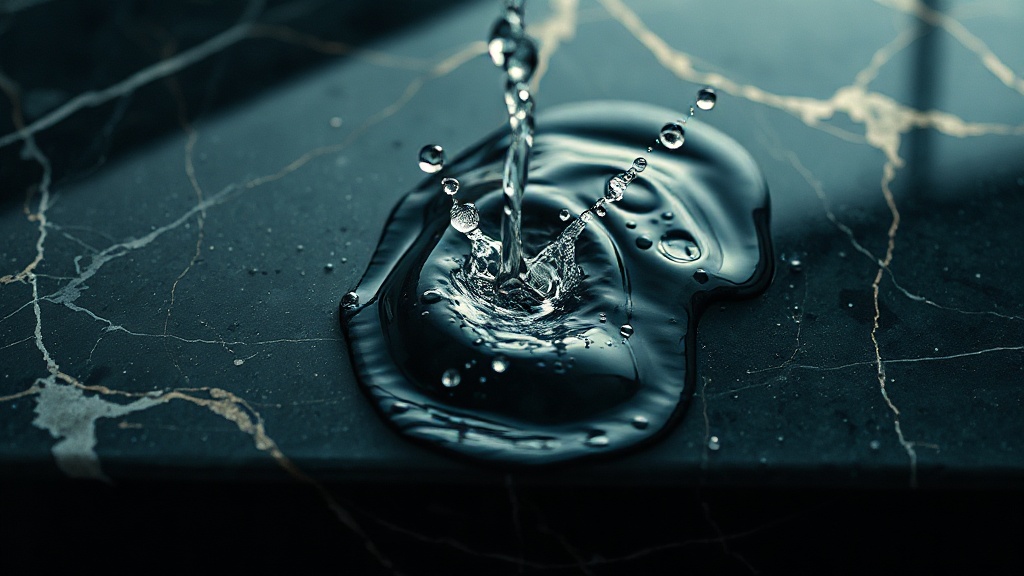
In testing, a prompt for a glass of water being knocked off a marble countertop in slow motion delivered genuinely usable footage on the third generation: the arc of the falling glass respected gravity, the water dispersed with surface tension, and the reflection on the marble was consistent throughout. That level of physical coherence, without NeRF-style pre-scanning or reference footage, is what separates Ray2 from older-generation tools. Compare it to what you would once have spent coaxing similar behaviour out of a simulation team in After Effects and the value proposition gets concrete fast. Very fast.
Blind-test comparisons on a panel of three hundred heterogeneous prompts show that Ray2 is slightly inferior to its Flash variant in scenes with complex physics (fluids, explosions, crowds in motion) but substantially equivalent on portraits, landscapes, and products. For hero shots where physics fidelity is the brief, stick to the standard Ray2 model rather than Flash.
Camera Control: Composable Moves, Real Director Language
Luma introduced Camera Angle Concepts in Ray2, described as intuitive, cinematic controls that bring nuance and storytelling depth to generative video. These Camera Motion Concepts are learnable controls for Ray2 that enable reliable and composable camera motion through minimal training examples.
In practice, this means you can stack a crane-up with a slow push-in and Ray2 will resolve them into a single coherent move rather than averaging them into mush. The system responds accurately to crane, dolly, tracking, and arc specifications in natural language, which matters more than any benchmark number because it determines how quickly a director can iterate on a shot without prompt archaeology.
The model excels at generating dynamic camera movements such as flythroughs, tracking shots, and wide explorations while maintaining spatial consistency. Where it stumbles is complex multi-subject blocking over longer durations. A tracking shot that follows a single subject through a space? Reliable. Two characters in the same frame with a motivated camera move? Budget for more iterations.
Camera control options include crane, tracking, and dolly moves, with outputs ranging from 5 to 10 seconds, extendable to 30 seconds, at resolutions of 540p, 720p, and 1080p with 4K upscale.
The Extension System: 30 Seconds, With Caveats
One of Ray2's practical strengths is its extension system. After generating a base clip of 5–10 seconds, you can extend up to 30 seconds total while the model preserves motion coherence, character identity, and scene physics.
That is genuinely useful for brand films and social content where a 20–25 second master cut is the deliverable. The caveat is that extensions are cumulative, and drift compounds. There is a practical limit to extension quality: documentation notes a cap at 30 seconds before quality degradation appears. Each subsequent extension can compound small inconsistencies, leading to drift in visual style or physical accuracy. For professional work requiring longer videos, better results come from stitching multiple independent generations in a video editor.
The honest workflow: generate your strongest 5-second base, extend once to 10 or 15 seconds, then cut to a new generation for the next scene. Treat Ray2 as a shot engine rather than a sequence engine and you will hit fewer walls.
Ray2 Flash: The Iteration Tool
In March 2025, Luma introduced Ray2 Flash, an optimised variant that retains the same core capabilities (text-to-video, image-to-video, audio, camera control) but with three significant operational advantages: three times reduced generation time, three times lower cost per clip, and extended availability across all paying subscribers including the base Plus tier.
Ray2 Flash is roughly three times faster and cheaper, which makes it the obvious place to test ideas and iterate before you commit to a final output. Use it to confirm shot direction, lighting mood, and camera motivation. Then lock the concept and switch to standard Ray2 for the render. That two-pass workflow will cut your monthly credit spend meaningfully, which matters given where the platform sits on pricing.
Pricing: The Honest Math
The Lite plan at $7.99/month annually (or $9.99 monthly) provides 3,200 credits, sufficient for roughly 100–150 short clips depending on resolution. The Unlimited plan at $75.99/month annually offers 10,000 fast-mode credits plus unlimited relaxed-mode generations, making it the only truly unlimited plan among major video generators.
Ray2 Standard costs 32 credits per second; Ray2 Flash costs 11 credits per second. A 5-second Flash clip at 720p runs 55 credits; adding 4K upscale adds 20 credits for a total of 75.
Monthly subscription credits do not roll over. They reset on your billing date. Top-up credits purchased separately carry across billing cycles and are consumed only after your monthly allocation is exhausted. For production workflows where shot volume spikes around deliverable deadlines, that top-up structure is worth understanding before you hit the end of a billing cycle mid-project.
For API access, Ray2 video runs approximately $0.08 per second as of May 2026. At scale, that is competitive, but the subscription route makes more financial sense for any team generating more than a handful of clips per week.
How It Compares: Runway Gen-4 and Kling 3.0
Every Ray2 discussion eventually becomes a three-way comparison. Here is where each model actually wins.
Runway Gen-4
Runway's Standard plan runs $12/month annually, or $15/month, with 625 credits per month. Credit costs run from 2 credits per second for Gen-4 Turbo images up to 25 credits per second for Gen-4.5 video. Runway is rarely the absolute cheapest option per finished second, but it is consistently the most productive option per finished second once you account for the time saved by motion brush, director mode, and the polished editing UI.
The verdict: Runway Gen-4 wins on the production editing suite. Its in-platform tools for inpainting, video-to-video transformation, and directed edits remain ahead of Ray2's interface. For teams that need both generation and editorial control in one environment, Runway holds its ground.
Kling 3.0
Kling 3.0 dropped on February 5th, 2026. It brings physics-accurate motion, multi-shot storytelling with up to six connected shots, and 4K 60fps via the new Omni One architecture. Paid tiers run from Standard at $6.99/month to Pro at $25.99/month annually.
Kling 3.0 holds the number one ELO benchmark score of 1243 among all AI video models, ahead of Google Veo 3.1, Runway Gen-4.5, and Pika 2.2. That is worth acknowledging. Where Kling earns that score is on multi-shot scene coherence and native multilingual audio, both of which Ray2 does not match natively.
The gap between Ray2 and Kling 3.0 on raw physics accuracy is narrower than the benchmark gap suggests. For single-shot product and environmental work (the bread-and-butter of commercial production) Ray2's output is consistently cleaner and easier to key or composite. Kling 3.0's edge is in scene-level multi-shot work. Know which job you are hiring for.
Where Ray2 Fits in a Real Production Stack
Ray2 earns its place as a primary generation engine for: single-shot product and environment work, physics-heavy hero shots, and any brief where a motivated camera move is the core creative ask. Ray2 produces fast coherent motion, ultra-realistic details, and logical event sequences, which increases the success rate of usable generations and makes outputs substantially more production-ready.
Adobe's announced integration of Ray2 into Firefly is a signal worth reading: when enterprise creative infrastructure starts embedding a model, adoption friction drops to near zero for teams already in the Adobe ecosystem.
More than a year after release, Ray2 remains one of the three or four reference AI video models in the market, alongside OpenAI's Sora 2, Google DeepMind's Veo 3, and Kuaishou's Kling 3. That staying power in a landscape where new models arrive monthly says more than any single benchmark.
The workflow recommendation: use Ray2 Flash to pressure-test briefs and lock shot direction, commit Ray2 Standard for final renders, and keep your editing pipeline (whether Runway or Premiere) downstream. Build the habit of generating four to six Flash variants before touching a Standard credit. Your monthly spend will reflect the discipline.
For any production house evaluating where AI video fits in the pipeline — not as a novelty but as a billable workflow — this is the conversation worth having now. See the full range of AI video production services at aivideos.eu and the live work in the gallery to see how Ray2 output integrates into finished deliverables.
Generate cinematic AI video, from €5.99
34 AI models. No subscription. Buy credits, generate on demand, own the results outright.
Also on Android. The AI Videos Studio app, with the same account and credits.